
A good Discord screenshot can do a weird amount of work.
It can sell the vibe of your indie game’s community before you have one. It can set up a punchline for a streamer skit. It can act like a little prop in a devlog, showing a “bug report” or “patch notes reaction” without having to wrangle real people into posting at the exact right time. And sometimes you just need a clean, readable mock conversation to storyboard a scene, the same way you’d mock a phone screen in a film shot.
The trick is making it look like Discord without accidentally creating something that feels misleading, sloppy, or too perfect. Below is a practical, creative workflow for generating fake Discord conversations that serve game dev and streaming needs, plus a few guardrails to keep you out of trouble.
First, decide what the screenshot is for
Before you type a single line of dialogue, pick the job your fake chat needs to do. The “why” changes everything:
- Trailer or Steam page flavor: short, punchy messages that read in half a second (“this boss is illegal”, “co-op is chaos”, “ship it”).
- Devlog storytelling: longer messages, more natural pacing, a mix of questions and clarifications (“can anyone reproduce on Linux?”, “here’s a clip”, “fixed in build 0.6.3”).
- Streamer skit: heightened personalities, a clear escalation, and room for timing (a message, a pause, then the kicker).
- Tutorial or classroom example: obvious placeholders, less realism, and careful labeling so nobody thinks it’s real community drama.
Write a one-sentence “purpose line” at the top of your notes. Example: This screenshot should make the new crafting system look understandable and fun in under three seconds. That line will keep you from over-writing.
Sketch the cast and the channel
Discord screenshots feel real because they imply context. You can fake that context quickly.
Pick 3 to 6 speakers. Give each one a role, not a personality essay. For a game dev server, roles might be:
- Dev (calm, factual)
- Mod (firm, friendly)
- Power user (helpful, slightly intense)
- New player (confused, honest)
- Gremlin (jokes, derailments)
Choose a channel name that does storytelling. `#bug-reports` reads differently than `#spoilers` or `#clips`. Channel names are tiny stage directions.
Decide what you’re implying about your community. Fast-moving and chaotic? Tight-knit and thoughtful? International? Your “background noise” should match.
Write messages that read like Discord, not like a script
Most fake chat fails because it’s too neat. Real chat has texture.
A few tricks that help:
- Use fragments. People rarely type full sentences when they’re excited.
- Mix message lengths. One-liners next to a mini paragraph feels natural.
- Add small corrections. “wait”, “typo”, “nvm found it” gives authenticity.
- Include one off-topic ping. A stray “anyone streaming tonight?” makes it feel lived-in, but keep it subtle.
If you’re building a streamer skit, write in beats, like comedy:
- Setup question
- Confident wrong answer
- Someone corrects with receipts
- Chat reacts with memes
- Streamer reads the worst possible line out loud
And if you’re doing a devlog prop, remember the practical detail: the screenshot is often on screen for one to two seconds. Put the important line where the eye lands first.
Generate the screenshot with a chat mockup tool
Once you have your lines, the fastest route is a generator that already understands the Discord look and spacing. I like tools that let you control names, avatars, timestamps, and small UI cues, because those details sell it.
For Discord specifically, a lot of creators start with a tool like fake discord chat, then iterate. The key is not “make it perfect,” it’s “make it plausible and readable.” If your screenshot is going into a YouTube thumbnail, increase contrast and trim anything that turns into mush at small sizes. If it’s going into a Steam page GIF, keep the message count low so viewers can actually parse it.
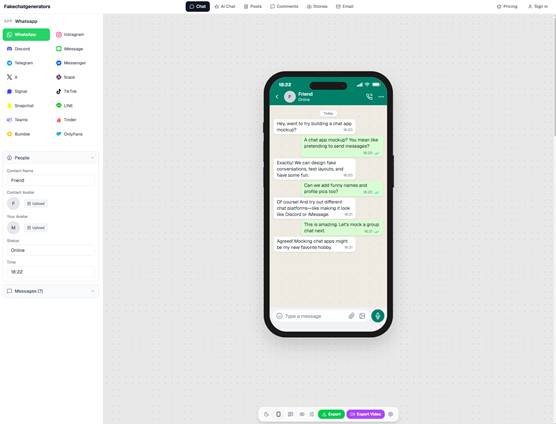
fakechatgenerators.com lets you mock up chat screenshots across 16 platforms
A practical workflow:
- Draft your conversation in plain text first.
- Paste or rebuild it in the generator.
- Export, then view it at final size (thumbnail, overlay, phone screen).
- Cut messages until it reads instantly.
Make it useful for game dev, not just funny
For developers, fake Discord chats can be more than a gag. They can be a design tool.
Use fake chat to test UI and onboarding language
If your game has chat, party invites, guild notices, or moderation prompts, mock conversations help you see tone problems quickly. A single “System: Your message violated…” line can reveal whether your wording sounds harsh, unclear, or oddly robotic.
Use it to stage “player reactions” while you prototype
Early in development, you might not have playtesters who write the exact kind of feedback you need for a marketing beat. A fake chat screenshot can help your team align on what you want players to talk about.
Not to deceive anyone, but to answer internal questions like:
- What features are we highlighting?
- What terms do we want fans to adopt (build names, boss nicknames)?
- What’s the community tone we’re aiming for?
Use it to storyboard community moments
A lot of games sell not just gameplay, but camaraderie. If you’re planning a trailer shot where someone types “run” and the screen cuts to chaos, you can map that pacing with a fake chat first.
For streamers: plan overlays and bits with intent
Streamers often use fake chats as props: “mod DM’d me,” “dev replied,” “chat is cursed,” and so on. The best versions are cleanly labeled and clearly a bit. Your audience should feel in on the joke.
A few overlay-specific tips:
- Avoid tiny timestamps. They fuzz out on compression.
- Keep names short. Long usernames wrap awkwardly.
- Pick avatars that read at 48px. Simple silhouettes beat detailed faces.
- Use fewer messages than you think. Four messages that land are better than twelve that blur.
If you want the screenshot to feel spontaneous, build in one “mistake” that you correct in the next message. It creates motion even in a still image.
Ethics and guardrails (the part people skip)
Fake chat screenshots are props. They can also be misinformation if you’re careless.
A few rules that keep things clean:
- Do not fake real people’s identities. Don’t use a real dev’s name, a real moderator, or a rival streamer to “quote” them.
- Avoid allegations, even as jokes. Anything implying misconduct can escape your context fast.
- Label when appropriate. “Mockup,” “skit,” or “concept” in the caption can save you headaches.
- Keep your server’s trust. If you run a community, tell your mods what you’re doing so nobody spends their evening investigating a screenshot you made for a thumbnail.
If you’re producing content professionally (brand deals, journalism-adjacent commentary, marketplace listings), consider verifying images that come back to you from collaborators or fans. Tools like an ai image detector exist for a reason, and Sightova specifically claims 98.7% detection accuracy across 50+ generative models with sub-150ms latency, plus checks for NSFW, violence, and document tampering. Even if you’re not “policing” your community, a quick check can prevent you from reposting something sketchy.
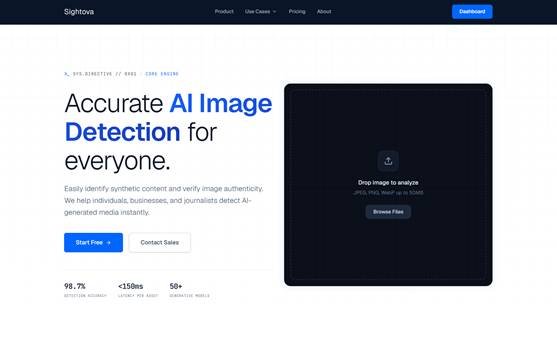
sightova.com flags AI-generated, tampered, NSFW, and violent imagery in milliseconds
A few conversation templates you can steal
Use these as starting points, then rewrite so they match your voice.
1) Patch notes hype (Steam page or trailer)
- Dev: “0.6.3 is live. Boss AI got meaner. Sorry.”
- PlayerA: “why does it dodge now”
- PlayerB: “it learned fear”
- Mod: “Please post clips in #highlights, I need to see this.”
2) Bug report clarity (devlog prop)
- NewPlayer: “inventory disappeared after teleport?”
- QA: “Which zone, and were you in co-op?”
- NewPlayer: “Frost Docks, solo. I can reproduce.”
- Dev: “Got it. Fix queued for tomorrow’s build, thank you.”
3) Streamer skit setup (overlay)
- Mod: “Reminder: don’t challenge the goose.”
- Streamer: “Why is that a rule.”
- Chatter: “because last time”
- Streamer: “Nobody tell me. I’m doing it.”
The final polish: make it look lived-in, not manufactured
Before you export your final image, ask two questions:
- Does this look like a real moment someone would screenshot?
- Is the joke or message obvious without reading every line?
If the answer is “no,” cut half the messages. Then cut one more. Add one tiny imperfection (a quick “lol” or a mid-thought message), and stop. Over-editing is what makes mock screenshots feel synthetic.
Used thoughtfully, fake Discord conversations are just another creative tool. Like concept art or temp music, they help you tell a story before the real version exists. And for game devs and streamers, that’s often the whole job.